MVC3----分部视图
发布时间:2019-08-05 16:35:13编辑:auto阅读(2189)
MVC3的分部视图相当于webform的用户控件
1,新建一个控制器PartialController.cs
2,新建一个视图(新建视图的时候,在弹出框中选择创建为分部视图)Message.cshtml,把这个文件放在Views/Shared这个文件夹下(约定优先于配置)
3,在视图中引用(Store/Index.cshtml)
-----控制器(PartialController.cs)
using System;
using System.Collections.Generic;
using System.Linq;
using System.Web;
using System.Web.Mvc;

namespace MusicStore.Controllers
{
    public class PartialController : Controller
    {
        //
        // GET: /Partial/

        public ActionResult Index()
        {
            return View();
        }
        public ActionResult Message()
        {
            return PartialView();//返回分部视图
        }
    }
}
-----分部视图(Message.cshtml)
我是分部视图
-----视图(Index.cshtml)
@{
    ViewBag.Title = "Index";
}

<h2>Index</h2>

<!--引用分部视图(输出:我是分部视图)-->
<li>@Html.Partial("Message")</li>


<!--Ajax请求模式(输出:我是分部视图)-->
<li id="a"></li>
<script type="text/javascript">
    $(function () {
        $("#a").load('/Partial/Message');
    });
</script>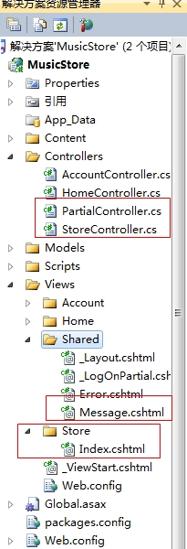
上一篇: 3.btrfs管理及应用
下一篇: MPLS的简单配置3
- openvpn linux客户端使用
52509
- H3C基本命令大全
52429
- openvpn windows客户端使用
42522
- H3C IRF原理及 配置
39431
- Python exit()函数
33864
- openvpn mac客户端使用
30827
- python全系列官方中文文档
29599
- python 获取网卡实时流量
24503
- 1.常用turtle功能函数
24361
- python 获取Linux和Windows硬件信息
22731
- LangGraph开发-多轮对话问答机器人
67°
- LangGraph开发-条件分支/循环图实战
85°
- LangGraph开发-生态介绍,入门demo实战
124°
- LangChain-接入12306-HTTP MCP智能体
296°
- LangChain接入自定义爬虫-MCP工具
292°
- LangChain接入Filesystem-MCP工具
297°
- LangChain搭建MCP服务端和客户端流程
348°
- LangGraph与MCP技术概述
293°
- LangChain 1.0-Agent中间件-实现闭环(批准-编辑-拒绝动作)
428°
- LangChain 1.0-Agent中间件-汇总消息
411°
- 姓名:Run
- 职业:谜
- 邮箱:383697894@qq.com
- 定位:上海 · 松江
