selenium-3 鼠标事件
发布时间:2019-07-04 10:04:51编辑:auto阅读(2540)
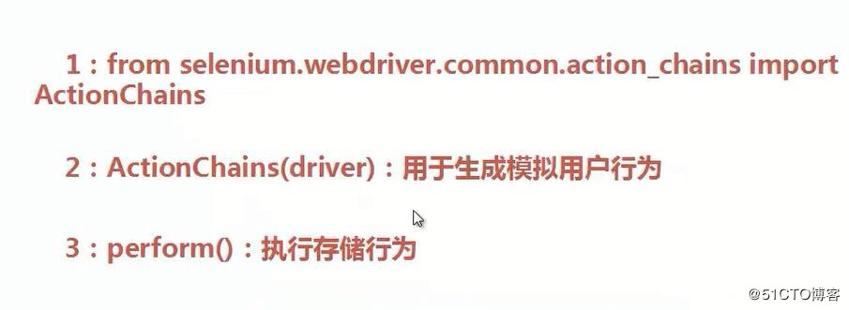
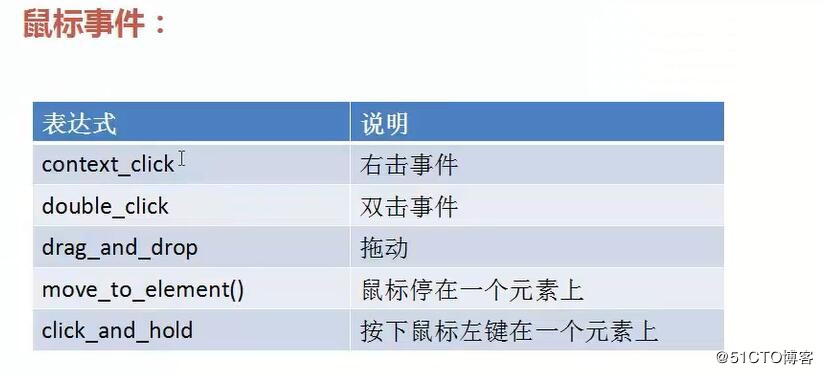
例:
from selenium import webdriver
b = webdriver.Firefox()
b.get("http://edu.51cto.com/courselist/index.html")
ele = b.find_element_by_link_text("找课程") #定位找课程元素
from selenium.webdriver.common.actiton_chains import ActionChains
ActionChains(b).move_to_element(ele).perform() #模拟鼠标停在"找课程"上 出现下拉菜单
ele1 = b.find_element_by_link_text("人工智能") #在下拉菜单中定位"人工智能"
ele1.click()
上一篇: 自己动手写struts3
下一篇: ceilmeter使用keystone
- openvpn linux客户端使用
52704
- H3C基本命令大全
52616
- openvpn windows客户端使用
42761
- H3C IRF原理及 配置
39634
- Python exit()函数
34010
- openvpn mac客户端使用
30976
- python全系列官方中文文档
29769
- python 获取网卡实时流量
24661
- 1.常用turtle功能函数
24499
- python 获取Linux和Windows硬件信息
22888
- LangGraph Studio可视化
239°
- LangSmith开发-应用入门
247°
- LangGraph开发-多轮对话问答机器人
308°
- LangGraph开发-条件分支/循环图实战
297°
- LangGraph开发-生态介绍,入门demo实战
336°
- LangChain-接入12306-HTTP MCP智能体
487°
- LangChain接入自定义爬虫-MCP工具
469°
- LangChain接入Filesystem-MCP工具
490°
- LangChain搭建MCP服务端和客户端流程
563°
- LangGraph与MCP技术概述
488°
- 姓名:Run
- 职业:谜
- 邮箱:383697894@qq.com
- 定位:上海 · 松江
